Best Computers for Golf Simulators (2026)
The best computers for golf simulators in 2026: gaming laptops, mini PCs, and desktops that run GSPro and E6 Connect smoothly, with the GPU, RAM, and CPU specs that matter.
The best computer for most golf simulators is a gaming laptop or mini PC with a dedicated NVIDIA RTX graphics card, at least 16GB of RAM, and a modern multi-core CPU. For a balanced all-rounder, the Lenovo Legion LOQ (RTX 5050, Core i7) runs GSPro and E6 Connect smoothly, the Acer Nitro V is the budget entry point, and the Lenovo Legion 5i (RTX 5070) handles high settings and 4K projector output. For a permanent built-in bay, a gaming mini PC like the MINISFORUM G1 Pro or ASUS ROG NUC hides real RTX power inside the enclosure. Here are six real picks plus the specs that actually matter.
Best Golf Simulator Computers for 2026

Acer Nitro V Gaming Laptop (RTX 4050, i5)
Entry gaming laptop with RTX 4050, Core i5-13420H, and a 165Hz screen, enough to run GSPro at medium-high settings on a budget.
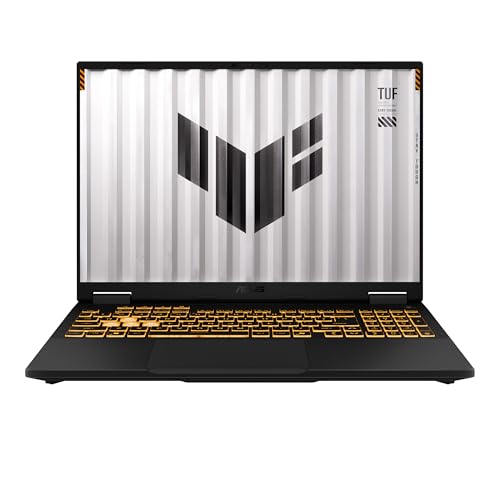
ASUS TUF Gaming F16 (RTX 5050, 16GB)
Durable 16-inch laptop with RTX 5050, Core i5-13450HX, 16GB DDR5, and a 165Hz panel, a balanced pick for full-time sim duty.
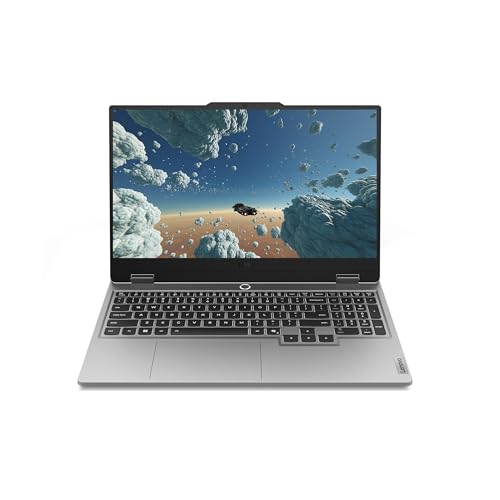
Lenovo Legion LOQ Gaming Laptop (RTX 5050, i7)
Core i7-13650HX, RTX 5050, 16GB RAM, and a 1TB SSD with strong cooling, a reliable all-around machine for GSPro and E6 Connect.

Lenovo Legion 5i Gaming Laptop (RTX 5070, OLED)
Core i7-14700HX, RTX 5070, 16GB RAM, and a 165Hz OLED display for high-settings sim play and 4K projector output.

MINISFORUM G1 Pro Gaming Mini PC (RTX 5060, Ryzen 9)
Compact desktop with Ryzen 9 8945HX, RTX 5060 8GB, 32GB DDR5, and quad 4K output, ideal for a permanent built-in sim bay.

ASUS ROG NUC Gaming Mini PC (RTX 5070, Core Ultra 9)
NUC-class powerhouse with Core Ultra 9, RTX 5070, 32GB DDR5, 1TB SSD, and Thunderbolt 4 in a tiny enclosure that hides in any bay.
Your computer renders the course, runs the physics, and drives the projector or display, so it is just as important as the launch monitor. The good news: modern simulator software is demanding but not extreme, and a mid-range gaming machine handles it easily. The key is a dedicated RTX graphics card. Office laptops, Chromebooks, and tiny integrated-graphics mini PCs cannot keep up with GSPro or E6 Connect at the settings that make a sim look and feel right. Everything below has a real GPU built for the job.
Quick comparison
| Computer | GPU | CPU / RAM | Best for | Price |
|---|---|---|---|---|
| Acer Nitro V | RTX 4050 | i5-13420H / 8GB | Budget entry laptop | $799.99 |
| ASUS TUF Gaming F16 | RTX 5050 | i5-13450HX / 16GB | Best value laptop | $1,045.00 |
| Lenovo Legion LOQ | RTX 5050 | i7-13650HX / 16GB | All-around laptop | $1,099.99 |
| Lenovo Legion 5i | RTX 5070 | i7-14700HX / 16GB | High settings + 4K | $1,599.99 |
| MINISFORUM G1 Pro | RTX 5060 | Ryzen 9 8945HX / 32GB | Built-in mini PC | $1,439.00 |
| ASUS ROG NUC | RTX 5070 | Core Ultra 9 / 32GB | Premium mini PC | $2,499.00 |
Prices and configurations on Amazon change often, so treat these as a snapshot. For a full rundown of minimum versus recommended specs and how they map to GSPro and E6 settings, see our golf simulator computer requirements guide. If you are still deciding on software, the GSPro vs E6 Connect comparison explains which package demands more from your machine.
Acer Nitro V (Best Budget)
The Nitro V is the cheapest sensible way into simulator gaming. Its RTX 4050 graphics, Core i5-13420H processor, and 165Hz display are enough to run GSPro at medium to high settings, and it includes Wi-Fi 6 and Thunderbolt 4 for connecting a projector or external display. The base model ships with 8GB of RAM, so budget for an upgrade to 16GB, since the chassis supports up to 32GB across two slots. For a first sim or a tight budget, it delivers real RTX performance without the premium price.
ASUS TUF Gaming F16 (Best Value)
The TUF line is built for durability, with a military-grade chassis and cooling tuned for sustained load, which suits a simulator that runs the GPU hard for hours. This F16 pairs an RTX 5050, a Core i5-13450HX, 16GB of DDR5, and a fast Gen4 SSD with a 16-inch 165Hz panel. It hits the sweet spot of price and performance for a machine that will be your everyday sim driver, and the larger 16:10 screen is a nice bonus for menus and setup before you mirror to the big screen.
Lenovo Legion LOQ (Best All-Around)
The Legion LOQ is the easy recommendation for most buyers. A Core i7-13650HX, RTX 5050, 16GB of RAM, a 1TB SSD, and Lenovo's strong Legion cooling add up to a smooth, dependable GSPro and E6 Connect experience at high settings. The i7 gives it more CPU headroom than the budget picks, which helps keep frame rates steady when the physics and graphics both load up. If you want one machine that just works without overthinking it, this is the all-around choice.
Lenovo Legion 5i (Best Premium Laptop)
Step up to the Legion 5i when you want maxed settings and clean 4K output to a projector. Its RTX 5070 graphics and Core i7-14700HX have the muscle to render GSPro at high detail while driving a sharp big-screen image, and the 165Hz OLED display is excellent for the times you play at the laptop itself. With 16GB of RAM and fast storage it has headroom to spare. It costs more, but for a flagship-quality sim that will stay current for years, it is worth the jump.
MINISFORUM G1 Pro (Best Mini PC)
If your simulator lives in a dedicated room or built-in enclosure, a gaming mini PC is the cleanest answer, and the G1 Pro packs a serious punch. It combines a Ryzen 9 8945HX, an RTX 5060 with 8GB of GDDR7, 32GB of DDR5, and a 1TB SSD into a compact 245-watt chassis with quad 4K output and Wi-Fi 7. It mounts out of sight, runs cool, and gives desktop-class performance without a bulky tower. For a permanent bay where you want the computer hidden, this is the pick.
ASUS ROG NUC (Best NUC-Class)
The ROG NUC is the premium small-form-factor option, putting a Core Ultra 9 and an RTX 5070 into a tiny, triple-fan-cooled enclosure with 32GB of DDR5, a 1TB NVMe SSD, and Thunderbolt 4. It has the graphics horsepower to run GSPro at high settings and 4K, yet it disappears into a cabinet or behind the screen. It is the most expensive machine here, but for a high-end, space-conscious built-in simulator that will not need an upgrade soon, the ROG NUC is hard to beat.
How we chose
We did not benchmark these machines in a test bay ourselves. Instead, we compared published manufacturer specifications, GPU and CPU class, RAM, storage, display and output options, and cooling design, then weighed them against the documented requirements of GSPro and E6 Connect and patterns in verified owner reviews on Amazon. We prioritized the dedicated RTX graphics card above all, since it is the component that determines whether simulator software runs smoothly.
We deliberately spread the picks across budgets and form factors, from an entry RTX 4050 laptop to a premium RTX 5070 mini PC, because the right computer depends on whether your sim is portable or permanent and how high you want to push the settings. Prices and exact configurations shift constantly on Amazon, so treat the listed specs and prices as a snapshot, and confirm the current configuration before buying.
Buying tips
Decide first whether you want a laptop or a fixed machine. A gaming laptop is portable, self-contained, and the simplest start, while a gaming mini PC or small desktop offers more performance per dollar and tucks permanently into a built-in bay. Then match the GPU to your ambitions: RTX 4050 or 5050 for medium-high settings, RTX 5060 for comfortable mid-range, and RTX 5070 for high settings and 4K projector output. Insist on at least 16GB of RAM, and step to 32GB if you run multiple displays or want long-term headroom.
Confirm the ports match your display. You want HDMI 2.1, DisplayPort, or Thunderbolt to drive a 4K projector, and a wired Ethernet option helps for online play in GSPro. Keep any laptop well ventilated, since simulator sessions load the GPU continuously and heat is the main enemy of sustained frame rates. For the complete spec breakdown and how it maps to each software package, read our golf simulator computer requirements guide, and check the best launch monitors to make sure your hardware and computer pair cleanly.
Golf Sim Build Planner
Room-fit worksheet, gear checklist, budget tracker, and wiring and lighting plan, in one printable planner that takes your build from idea to first swing.
We also have full reviews of each: MINISFORUM G1 Pro review and ASUS ROG NUC (2025) review and Lenovo Legion 5i review.
Frequently Asked Questions
What computer do I need to run a golf simulator?
For smooth play in GSPro or E6 Connect you want a machine with a dedicated NVIDIA RTX graphics card, at least 16GB of RAM, and a modern multi-core CPU. An RTX 4050 or 5050 laptop handles medium-high settings, while an RTX 5060 or 5070 drives high settings and 4K projector output without stutter. Integrated graphics in office laptops and most mini PCs are not enough. See our golf simulator computer requirements guide for the full breakdown.
Can I run GSPro on a laptop?
Yes. A gaming laptop with an RTX 4050 or better, 16GB of RAM, and a recent Intel or AMD CPU runs GSPro well, and a laptop is the easiest way to start because it is self-contained and portable. The Acer Nitro V and ASUS TUF F16 are affordable entry points, while a Legion 5i with an RTX 5070 gives you headroom for maxed settings and 4K output. Just keep the laptop ventilated, since sim sessions push the GPU continuously.
Is a mini PC good enough for a golf simulator?
It depends on the mini PC. Tiny office models with integrated graphics cannot run modern sim software, but gaming mini PCs with discrete RTX GPUs, like the MINISFORUM G1 Pro or ASUS ROG NUC, absolutely can. These pack a real RTX 5060 or 5070 into a box small enough to mount inside an enclosure, which makes them ideal for a permanent built-in bay where you do not want a full tower or a laptop taking up space.
How much RAM and what GPU do I need?
Plan for 16GB of RAM as a baseline and 32GB if you run multiple monitors, streaming, or want long-term headroom. The graphics card matters most: an RTX 4050 or 5050 is the practical entry point, an RTX 5060 is a comfortable mid-range, and an RTX 5070 handles high settings at 4K. The CPU should be a recent six-core or better, such as an Intel Core i5/i7 HX or AMD Ryzen 7/9 mobile chip, to keep frame rates steady.
Do I need a desktop or is a laptop fine?
Both work. Laptops are simpler, portable, and self-contained, which is why most first-time builders choose one. Desktops and gaming mini PCs offer more performance per dollar, run cooler under sustained load, and tuck permanently into a built-in bay. If your simulator lives in a dedicated room, a mini PC or small desktop is the cleaner long-term answer. If you want flexibility or a single device for golf and other tasks, a gaming laptop is the easier path.
Will these computers drive a 4K projector or big screen?
Yes, the RTX-equipped machines here all output 4K and high refresh rates suitable for a simulator projector or large display. An RTX 5060 or 5070 has the headroom to render GSPro at high settings while pushing a 4K image, and most of these laptops and mini PCs include HDMI 2.1 or DisplayPort plus Thunderbolt. Match the cable to your projector's input, and confirm the projector and software resolution before finalizing your setup.
Building a golf sim?
Use our free calculators and guides to size the room, the gear, and the budget.
Build Planner: $39