Golf Simulator Flooring: Level, Protect & Cushion
How to build golf simulator flooring: leveling over concrete, subfloor, foam and turf layers, matching mat height to your stance, floor protection, and joint comfort.
Good simulator flooring does three jobs: it keeps your stance level so your swing and your data stay honest, it protects the floor underneath from clubs and impact, and it cushions your joints so you can hit balls for an hour without aching. The winning approach is a layered build: a stable, level subfloor, a shock-absorbing foam layer, and turf or a hitting mat on top, with the surrounding floor raised to match the mat so your feet and the ball sit on the same plane. This guide covers each layer, how to level over concrete, and why mat height matters more than most builders realize.
Flooring is part of your overall room plan, so size your space first with the golf sim room size calculator. Then match a hitting surface to your build using our best golf hitting mats guide.
Flooring shopping list
The four layers that build a level, quiet, course-like bay floor, from the slab up.
-
 Foam subfloor BalanceFrom Puzzle Exercise Mat 3/4-inch, 96 sq ft
The cushioned foam subfloor that goes down first to quiet impact and protect the slab.
-
 Surface turf Heyroll Artificial Turf Grass Roll, 7 ft x 15 ft
A full-bay turf roll over the foam for a course-like surround you drop your hitting mat into.
-
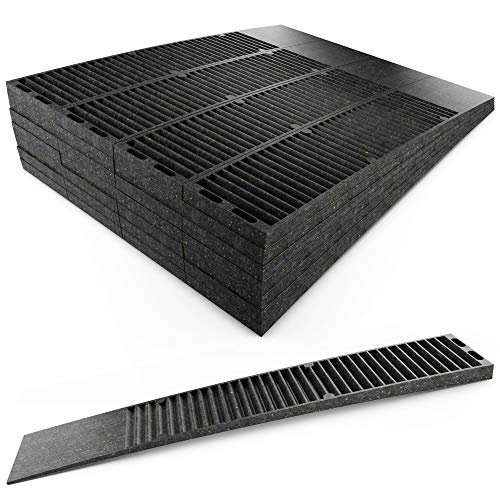 Leveling PHYXOLOGY SUPPLY Pro-Grade Composite Shims, 24 pack
Snap-off shims to true up an uneven slab so the mat sits flat and your stance stays level.
-
 Putting strip Putt-A-Bout Grassroots Par Three Putting Green, 9 ft x 3 ft
A roll-out putting strip that sets into the surround so the bay doubles for short-game work.
Prices update on Amazon and change often. As an Amazon Associate we earn from qualifying purchases at no extra cost to you.
Why level matters more than you think
Your stance is the foundation of every swing, and a simulator quietly exposes any flaw in it. If the floor under your feet slopes, or your hitting mat sits a full inch above the floor you stand on, your weight distribution and swing low point shift. The result is inconsistent contact and launch monitor numbers that do not match your real game. A radar or photometric unit reads exactly what you give it, so an uneven stance feeds it bad input.
The fix is to make the entire hitting and standing area flat and level, then ensure your feet sit on the same plane as the ball. Always test your own full swing on the finished surface, since balance issues show up most at the top of the backswing and through impact.
The three-layer system
Think of simulator flooring as a sandwich. Each layer does a specific job, and skipping one shows up as discomfort or inconsistency later.
| Layer | Material options | Job it does |
|---|---|---|
| Subfloor (bottom) | Plywood, OSB, adjustable panels, foam tiles | Levels the surface and protects the floor below |
| Cushion (middle) | High-density foam, rubber underlayment | Absorbs shock and protects your joints |
| Surface (top) | Turf rolls, hitting mat, putting turf | The hitting and standing surface you play on |
The subfloor
The subfloor levels everything and shields the floor underneath. Over a flat surface, foam tiles alone can serve as a combined subfloor and cushion. Over an uneven or sloped slab, a plywood or OSB base, shimmed flat, gives you a true level platform to build on. This is also your first line of floor protection, keeping clubs, ball marks, and mat pressure off the original surface.
The cushion
The middle foam layer is what saves your joints. Hitting off turf laid straight onto concrete sends impact shock into your wrists, elbows, and lower back, and it is the fastest way to end a session early. A high-density foam or rubber underlayment dampens that shock and quiets vibration into rooms below. This layer matters most in basements and garages, where bare concrete is the default.
The surface
On top goes your turf and hitting mat. Many builders run continuous turf across the whole area for a clean look, then place a dedicated hitting mat or strip in the swing zone where wear concentrates. A good hitting mat also contributes cushioning, so it works with the foam layer rather than replacing it.
Matching mat height to your stance
This is the detail that separates a comfortable build from an awkward one. If your hitting mat is thicker than the surrounding floor, you stand in a small valley below the ball, which subtly changes your low point and balance. The fix is to raise the floor around the mat so the standing surface matches the mat's height, putting your feet and the ball on the same level plane.
In practice: measure your hitting mat's thickness, then build the surrounding floor up to match it with subfloor panels or foam tiles. If your mat is one inch thick, the stance area should rise about one inch too. The goal is a seamless transition where you can shuffle from your stance into the ball without stepping up or down. Many premium builds inlay the mat into the surrounding turf so the two surfaces are flush.
Protecting the floor underneath
Whatever is under your simulator, concrete, hardwood, tile, or carpet, deserves a protective base. Foam tiles, rubber gym flooring, or a plywood subfloor guard against dropped clubs, fat shots that catch the floor, and the steady pressure of a heavy mat. Protection also cuts noise into rooms below, which matters in a basement build.
- Over hardwood: never set a mat directly on the finish. Grit trapped underneath will scuff it. Use a full protective underlayment.
- Over concrete: prioritize the foam cushion layer for both joint comfort and a small amount of moisture buffering.
- Over carpet: add a firm subfloor panel so the surface does not flex and shift under your stance.
Comfort that keeps you swinging
The payoff for getting flooring right is simple: you hit more balls, more comfortably, with data you can trust. A level platform keeps your stance and numbers honest, a foam layer spares your joints, and matching the mat height to the surrounding floor removes the awkward step that throws off your balance. Plan the floor as carefully as you plan the launch monitor, because it is the surface you stand on for every single shot.
Ready to build? Confirm your room dimensions in the room size calculator, then pick a surface from our best golf hitting mats guide to finish the top layer.
Golf Sim Build Planner
Room-fit worksheet, gear checklist, budget tracker, and wiring and lighting plan, in one printable planner that takes your build from idea to first swing.
Frequently Asked Questions
Why does golf simulator flooring need to be level?
Because your stance directly affects your swing and your data. If your hitting mat sits higher than the floor your feet stand on, or the floor itself slopes, your weight shift and low point change, and the launch monitor reads shots that do not reflect your real swing. A level surface, with your feet on the same plane as the ball, gives consistent contact and accurate numbers. On a sloped or uneven floor you must level the surrounding surface up to the mat height.
Should the hitting mat be level with the surrounding floor?
Yes. The ideal is for your feet and the ball to sit on the same plane, so your stance is level with the hitting surface. A common build raises the floor around the mat with a subfloor or foam tiles so the surrounding surface matches the mat's thickness. If your mat is one inch thick, build the surrounding floor up about one inch. This prevents the awkward step up or down that throws off balance and ball striking.
What goes under a golf simulator hitting mat?
A layered system works best: a stable subfloor on the bottom, a shock-absorbing foam layer in the middle, and the turf or hitting mat on top. Over concrete, the foam layer is the most important part because it cushions your joints and dampens vibration. Some builders add a plywood or foam-tile subfloor first to level an uneven slab, then foam, then turf. The goal is a flat, level, cushioned surface that protects both you and the floor.
How do I protect my floor from a golf simulator?
Lay a protective base layer under the entire hitting area before anything else. Foam tiles, rubber gym flooring, or a plywood subfloor shield concrete, hardwood, or tile from dropped clubs, ball marks, and the constant pressure of a mat. A protective layer also reduces noise transmission to rooms below. For hardwood especially, never set a hitting mat directly on the finish, since grit under the mat can scuff it over time.
Does golf simulator flooring help with joint pain?
Yes, cushioning is one of the biggest comfort factors in a home build. Hitting off a thin mat over bare concrete sends shock straight into your wrists, elbows, and lower back, and it will cut your sessions short. A foam underlayment beneath the turf absorbs impact and reduces that jarring, letting you hit more balls comfortably. Pair a cushioned floor with a quality hitting mat, since the mat itself also affects how much shock reaches your joints.
Can I build a simulator floor over an uneven concrete slab?
Yes. Garage and basement slabs often slope toward a drain, so you level the hitting area on top of the slab rather than touching the concrete. Use adjustable subfloor panels, shims under a plywood base, or self-leveling techniques to create a flat platform, then add foam and turf. Check the surface with a long level across the whole hitting and stance area. A level platform over the slope gives you a consistent stance without major construction.
Building a golf sim?
Use our free calculators and guides to size the room, the gear, and the budget.
Build Planner: $39